How to Charge Anker 737 Power Bank? Step by Step Guide for 2026
Charging your Anker 737 power bank correctly is essential for maintaining its high-speed performance and longevity. By using a high-wattage USB-C Power Delivery wall charger and a certified cable, you ensure the device reaches full capacity in under an hour. Always prioritize quality accessories to protect your investment and keep your tech powered up anywhere.
The Anker 737 Power Bank (often referred to as the PowerCore 24K) is a masterpiece of portable energy technology. In 2026, we rely on our gadgets more than ever, and having a reliable, high-capacity battery is like having a safety net for your digital life.
If you have just picked one up, or if you are looking to refine how you maintain your device, you are in the right place. Charging your Anker 737 power bank is a simple process, but doing it correctly makes a world of difference in how long it lasts.
Think of the Anker 737 as the powerhouse of your backpack. Whether you are charging a high-end laptop, a drone, or your smartphone, the efficiency starts with how you fill it back up. In this guide, we will break down the exact steps, the best equipment to use, and the habits that will keep your Anker 737 running at peak performance for years to come. Let’s dive into the world of smart charging.
Key Takeaways
- Use High-Wattage Chargers: To unlock the fastest charging speeds for the Anker 737, use a wall charger that supports at least 100W of power.
- Cable Compatibility: Always use a USB-C to USB-C cable capable of handling 5A/100W to avoid bottlenecks during the power transfer process.
- Temperature Control: Avoid charging your power bank in extreme heat or direct sunlight, as this can degrade the internal battery cells over time.
- Smart Charging Habits: You do not need to drain the battery to 0% before charging; partial charges are perfectly healthy for modern lithium batteries.
- Firmware Awareness: Keep an eye out for potential updates through the Anker app to ensure your power bank’s management system remains optimized.
- Storage Best Practices: If you plan to store the device for a long time, keep it at around 50% charge to prevent capacity loss.
Understanding the Input Capabilities of Your Anker 737
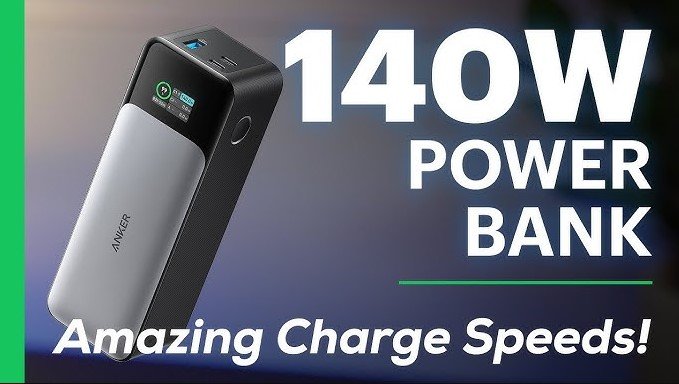
The Anker 737 is famous for its massive 24,000mAh capacity and its ability to handle serious power. To charge the Anker 737 power bank efficiently, you need to understand that it supports up to 140W of input via its USB-C port.
This means it can accept power incredibly quickly if you have the right gear. Many people make the mistake of using a standard phone charger, which will technically work, but it will take hours longer than necessary.
The Role of Power Delivery (PD)
Power Delivery is the secret sauce behind modern charging. The Anker 737 uses PD technology to negotiate the fastest safe charging speed with your wall adapter. When you plug in a compatible charger, the device communicates with the adapter to draw the maximum wattage available. If you use a 30W charger, your device will charge at 30W. If you use a 140W charger, it will fill up at its maximum potential speed.
Why Wattage Matters
In 2026, we have access to incredibly powerful GaN (Gallium Nitride) chargers. These are small, efficient, and perfect for the Anker 737. Using a low-wattage charger is not harmful, but it is inefficient. If you are in a rush at an airport or a coffee shop, you want that 140W capability. Understanding how to charge Anker 737 power bank effectively means matching the input power to the device’s capability.
Selecting the Right Charging Equipment
You cannot talk about charging without talking about the cables and bricks you use. If you have ever wondered why your devices sometimes charge slowly, it is almost always due to a weak cable or an underpowered wall brick. To master how to charge Anker 737 power bank, you need a setup that respects the high-performance nature of the unit.
Visual guide about How to Charge Anker 737 Power Bank
Image source: cdn.shopify.com
Choosing the Perfect Wall Charger
Look for a GaN charger that supports 100W or 140W output. These chargers are smaller than the old-school bricks from a few years ago, making them perfect for travel. When checking the box or the website, ensure it explicitly mentions “USB-C Power Delivery 3.1” or at least 3.0. This standard is what tells the Anker 737 that it is okay to pull that high wattage safely.
The Importance of a 5A Rated Cable
A charger is only as good as the cable connected to it. When you are pushing high power, you need a cable designed for it. Look for a USB-C cable that explicitly states it supports 100W or 240W charging (often marked with “5A” or “5 Amps”). If you use a cheap cable designed only for data or slow charging, it will act as a bottleneck. It might even get warm, which is a sign that it is not up to the task.
Step-by-Step: How to Charge Anker 737 Power Bank
Now that you have the right gear, let’s get down to the actual process. It is surprisingly simple, but following these steps will ensure you are doing it safely every time.
Connecting the Devices
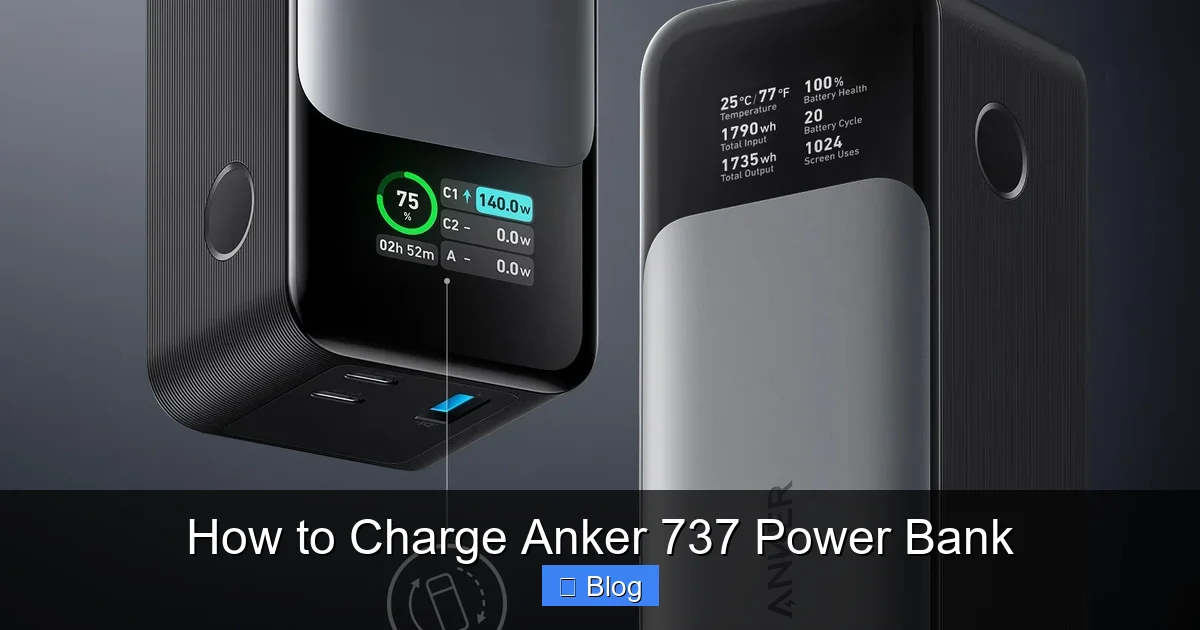
First, plug your high-wattage wall adapter into a wall outlet. Next, connect your USB-C cable to the output port of the wall adapter. Finally, plug the other end of the cable into the USB-C port on the Anker 737. You will immediately notice the smart digital display on the front of the power bank light up. This screen is one of the best features of the device, as it provides real-time data on how much power is being taken in.
Monitoring the Display
The screen on the Anker 737 is not just for show. It shows you the input wattage, the battery percentage, and the time remaining until full charge. If you see the input wattage significantly lower than what your charger should provide, double-check your cable connections. Ensure everything is pushed in firmly. Sometimes, a loose connection can cause the charger to default to a lower, “safe” charging mode.
The Charging Cycle
As the battery nears 100%, you will notice the wattage on the screen start to drop. This is completely normal and is a sign of the battery management system (BMS) working correctly. The BMS slows down the intake of electricity as the cells reach their capacity to prevent overheating and to ensure a safe, long-term charge. You don’t need to do anything; the device handles the entire process intelligently.
Tips for Maintaining Battery Health
You have invested in a premium product, and you want it to last. How to charge Anker 737 power bank is also about how you treat it when it is not in use. Batteries are chemical entities, and they thrive when treated with a bit of care.
Avoid Extreme Temperatures
Lithium-ion batteries hate extreme heat. If you are charging your power bank inside a hot car during the summer or sitting it right on a radiator in the winter, you are hurting the battery’s long-term health. Keep the device in a cool, dry place while charging. A room temperature environment is perfect.
Charging Frequency and Habits
There is a common myth that you should let your battery die completely before charging it. For modern lithium batteries, this is actually bad advice. You are better off topping it up whenever you have the chance. If you are at 40% and have a charger nearby, plug it in. Shallow discharge cycles actually help the battery last longer over the course of several years.
Long-Term Storage
If you know you won’t be using your Anker 737 for a few months, do not leave it at 0% or 100%. Aim for about 50% to 60%. Storing a battery at full charge can cause it to lose capacity over time, and storing it at empty can lead to a “deep discharge,” which might prevent the battery from ever charging again. Checking it once every few months to see if it needs a small top-up is a great habit.
Troubleshooting Common Charging Issues
Even with the best tech, sometimes things go wrong. If you are struggling with how to charge Anker 737 power bank, here are some quick fixes for the most common issues.
Why is it charging slowly?
If the display shows a low input wattage (e.g., 5W or 10W), check your cables and charger first. If you are using a third-party cable, try the original Anker cable that came with the unit. Also, try a different wall outlet. Sometimes, smart power strips can limit the output if they detect a high load. If the issue persists, try resetting the unit by holding the button or simply leaving it unplugged for a few minutes before trying again.
The Screen Isn’t Lighting Up
If the power bank is completely dead, it might take a few seconds of being plugged in before the screen shows any life. This is normal. If it still doesn’t turn on after a few minutes, check your charging brick. Is the brick actually plugged into a live wall socket? It sounds silly, but we have all been there. Try a different charger to rule out an adapter failure.
Conclusion
Learning how to charge Anker 737 power bank effectively is the key to getting the most out of your gear. By using a powerful 140W charger, a high-quality 5A cable, and following smart storage habits, you are ensuring that your portable power solution remains reliable for years to come.
In 2026, technology moves fast, but the basics of battery care remain the same. Take care of your equipment, and it will take care of you, keeping your laptop and phone running no matter where your adventures take you. Whether you are traveling for work, camping in the wilderness, or just powering through a long day, you can feel confident that your Anker 737 is ready for anything.
Frequently Asked Questions
Do I need to use the original cable included with the Anker 737?
While the original cable is high-quality and tested to support the device’s maximum speed, you can use any high-quality USB-C cable. Just ensure it is rated for at least 5A/100W to maintain high-speed charging performance.
Can I charge my phone and the power bank at the same time?
Yes, the Anker 737 supports pass-through charging. You can plug the power bank into a wall charger and connect your phone to the power bank simultaneously to charge both devices.
Is it safe to charge the Anker 737 overnight?
Yes, it is perfectly safe. The device features built-in protection circuits that automatically stop the charging process once the battery reaches 100%, preventing overcharging.
Why does the power bank get warm while charging?
It is normal for both the charger and the power bank to become warm during high-speed charging. This is simply the heat generated by the energy transfer process, but it should never be dangerously hot to the touch.
Can I charge the Anker 737 using a solar panel?
You can use a solar panel, provided it has a USB-C Power Delivery output that meets the power requirements. However, charging speeds will vary significantly based on sunlight intensity and panel efficiency.
What should I do if the power bank won’t hold a charge?
If the device is not holding a charge, try a different high-wattage wall adapter and cable to rule out accessory failure. If the problem continues, you may need to reach out to Anker’s customer support for a warranty assessment.