How to Turn on Anker Portable Charger? The Magic of Automatic Activation
Most Anker portable chargers turn on automatically when you plug in your device, making the process incredibly simple for users. If your specific model features a button, a quick press or hold will wake up the unit to start the charging process. Always check your LED indicators to confirm that power flow has successfully begun.
We have all been there. You are out on a hike, at a coffee shop, or traveling through an airport, and your phone battery hits that dreaded red zone. You reach into your bag, pull out your trusty Anker portable charger, and realize you are staring at it, wondering, “How do I actually get this thing to work?” If you are currently dealing with this moment, take a deep breath. You are definitely not alone.
Anker has built a reputation for creating some of the most reliable charging accessories on the market in 2026. Because they produce so many different styles—from slim pocket versions to massive high-capacity bricks the way you interact with them can vary. This guide will walk you through exactly how to turn on Anker portable charger units so you can get back to your day without the anxiety of a dead battery.
Key Takeaways
- Automatic Activation: Most modern Anker power banks detect connected cables and start charging without any user input.
- The Power Button: If your model has a physical button, it is typically used to check battery levels or manually wake the device.
- LED Indicators: Understanding the light patterns on your Anker portable charger helps confirm if it is active or needs a recharge.
- Connection Matters: Ensure your cable is fully inserted into both the power bank and your mobile device for a stable charge.
- Troubleshooting Steps: If your charger fails to start, try a different cable, perform a soft reset, or ensure the bank itself is charged.
The Magic of Automatic Activation
The most common question users ask is about the power button. For many newer Anker devices, you might notice that there isn’t a button at all, or the button seems to do almost nothing. That is because Anker designs their latest hardware with smart-sensing technology.
Plug and Play Simplicity
For the vast majority of Anker power banks available today, you do not need to press anything. The device is designed to detect the electrical impedance when you plug in a charging cable. Once the connection is made between the power bank and your smartphone or tablet, the internal circuit completes, and the power bank wakes up automatically.
If you have just plugged in your cable and nothing is happening, try unplugging it and plugging it back in firmly. Sometimes, the connection might be slightly loose. Listen for that subtle click of the cable seating into the USB-C or Lightning port. If the device is working, you should see the LED lights on the side of the charger illuminate instantly.
Why Auto-On is the Standard
Auto-on technology is not just about convenience; it is about battery preservation. By staying in a “sleep” mode when not in use, the charger prevents unnecessary battery drain. This means you can keep it in your bag for weeks at a time, and it will still have juice when you finally need it. This design choice highlights why Anker remains a leader in the portable power industry.
Understanding the Physical Power Button
If you own an older model or one of the high-capacity, heavy-duty “PowerCore” series units, you might see a physical button on the side or top. Understanding how to turn on Anker portable charger units that feature this button is essential for troubleshooting.
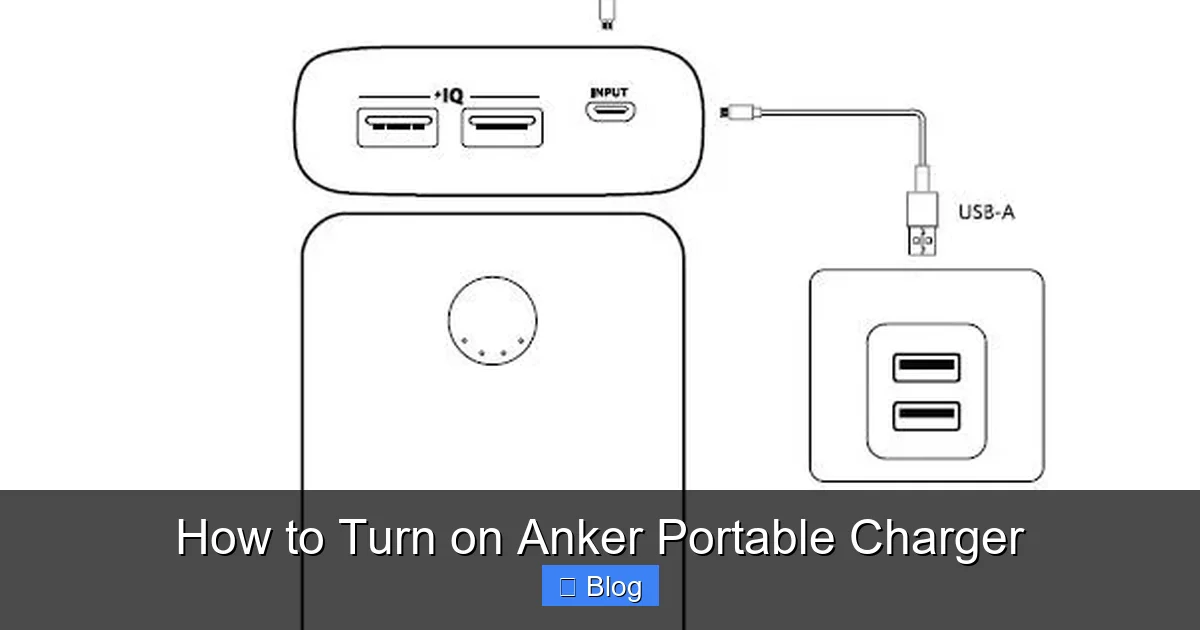
Visual guide about How to Turn on Anker Portable Charger
Image source: iniupower.com
The Single Press vs. Long Press
Usually, a single quick press of the power button acts as a battery level indicator. The LEDs will glow for a few seconds to show you how much power is left. If you need to manually initiate a charge for a low-power device like wireless earbuds or a smartwatch a long press or a double-tap is often required. This is called “trickle-charging mode” or “low-current mode.”
Using Low-Current Mode
Sometimes, devices with tiny batteries don’t draw enough power to trigger the charger’s automatic sensor. If you notice your earbuds aren’t charging, look for a small light that indicates low-current mode.
You usually activate this by holding the power button for three to five seconds until the LED color changes or a specific pattern appears. This forces the Anker portable charger to stay “on” and output power even if the device being charged isn’t drawing much energy.
Interpreting Your LED Indicators
The LED lights on your Anker portable charger are your best friends. They are not just for show; they provide the status report for your power supply. If you are struggling to figure out how to turn on Anker portable charger hardware, looking at these lights will tell you exactly what is going on.
Solid vs. Blinking Lights
When you initiate a charge, you want to see solid lights that represent the current capacity. If the lights are blinking, it typically indicates that the power bank itself is currently charging. However, if the lights blink in a specific sequence while you are trying to charge your phone, it could be a sign that the power bank is trying to communicate an error or that it is completely empty.
What if the Lights Do Not Turn On?
If you press the button and absolutely nothing happens, your first step should be to check the status of the power bank. Even the best hardware needs to be refilled. Plug your Anker unit into a wall charger using a reputable cable. If the lights start flashing, you know the bank was simply drained of power. Let it charge for at least thirty minutes before trying again.
Troubleshooting Common Activation Issues
Even with the most high-tech equipment, things can go wrong. If you find yourself asking how to turn on Anker portable charger after following all the steps, it is time to do a little detective work. Most issues are minor and easily fixed at home.
Cable Integrity and Compatibility
In 2026, we have a mix of USB-C, Lightning, and even older micro-USB devices. If the cable you are using is damaged or frayed, the “handshake” between the power bank and your phone will fail. Try switching the cable for a new one, preferably a certified one from Anker or a similar quality brand. Cheap, knock-off cables often lack the data pins required to tell the power bank to “wake up.”
The Soft Reset Technique
Did you know you can reset some power banks? If the internal processor of the power bank has become unresponsive, you can perform a soft reset. Plug the charging cable into the input port of the power bank and the other end into its own output port (if the model supports it) or simply plug it into a wall charger. This cycle often clears internal errors and restores normal functionality. It is like restarting your computer when it gets stuck.
Checking for Obstructions
This sounds simple, but it happens more than you think. Lint and pocket debris can accumulate in the USB ports of your Anker portable charger. If the metal contacts are blocked, the connection won’t be made. Use a non-conductive toothpick to gently clear any debris from the ports, and try plugging in your device again. Be very gentle to avoid bending the pins inside the port.
Best Practices for Longevity
Now that you know how to turn on Anker portable charger, you want to make sure it stays reliable for years to come. Maintaining your device is just as important as knowing how to operate it.
Avoid Extreme Temperatures
Leaving your power bank in a hot car during the summer or in a freezing garage during the winter will drastically reduce its lifespan. Batteries hate extreme temperatures. Keep your charger in a cool, dry place, like your backpack or desk drawer, to ensure the internal lithium-ion cells remain healthy.
Storage Tips for Long Breaks
If you aren’t planning to use your charger for a few months, don’t leave it completely empty. Store it at around 50% capacity. Storing a battery at 0% for a long time can lead to a condition where the battery “drops” below the voltage threshold needed to recharge. Storing it at 100% can also stress the battery chemistry over time. Aim for that middle ground to keep the cells happy.
Conclusion
Learning how to turn on Anker portable charger devices is a straightforward process once you know what to look for. Whether your device uses smart auto-activation or a traditional physical button, the goal is always the same: keep your devices powered and ready for your next adventure.
By following these simple steps ensuring a solid connection, checking your cables, and understanding those helpful LED lights you can troubleshoot almost any issue that comes your way. Anker continues to set the bar for mobile power, and these tools are designed to be as user-friendly as possible.
If you treat your charger with care and keep your cables in good shape, your Anker unit will continue to be a reliable companion for all your mobile power needs well into the future. Stay charged, stay connected, and enjoy the freedom that comes with having portable power in your pocket.
Frequently Asked Questions
Do all Anker chargers have a power button?
No, many newer Anker portable chargers use automatic sensors that start charging as soon as you plug in a device. If your charger lacks a button, it is designed to activate and deactivate based on the connection status.
How do I know if my Anker charger is turned on?
When active, the LED indicator lights on your Anker charger will glow to display the remaining battery capacity. If the lights are off, the charger is in sleep mode and is not currently delivering power.
What does a blinking light mean on my Anker power bank?
A blinking light usually indicates that the power bank is currently being recharged by an external source. If it blinks while you are trying to charge a device, it might suggest the bank has a very low battery or is experiencing a connection error.
Why isn’t my Anker charger detecting my phone?
The most common cause is a faulty cable or a loose connection. Try using a different charging cable or ensure the USB port is clean and free of pocket lint or debris.
How do I use the low-current charging mode?
On models that support it, you usually activate low-current mode by pressing and holding the power button for several seconds until an LED light changes color or blinks in a unique pattern. This mode is perfect for charging items like Bluetooth headphones or smartwatches.
Can I leave my Anker charger plugged in all the time?
While Anker chargers have built-in safety features to prevent overcharging, it is best practice to unplug them once they are fully charged. This helps maintain the health of the internal battery and reduces unnecessary electricity usage.